You built a browser??
Consider the tool you use the most daily, for literally everything. School assignments, research, documentation - it's all reliant on a web browser. One of the reasons why I'm able to get away with using Linux for my studies is because everything is already on the web. I don't need to download a bunch of programs to access the information I need. I have one app and I use it all day long, every day.
Why I made it
Let's consider one major workflow component of a Linux power user: the tiling keyboard-oriented desktop environment. Go from a blazing-fast keyboard TUI to a mouse-only UI and you'll see that you start using a mouse more. If you're mixing keyboard programs with mouse programs, you will find yourself using the mouse more. It's quite disruptive to your workflow!
There also exists other WebkitGTK vim-like browsers like Rosenrot and vimb (and more widely used WebkitGTK browsers like Epiphany/GNOME web) but they didn't tick all the boxes. I needed vertical tabs and features that you would expect out of a browser like page searching and window handling. Although vimb is quite smart in its way of allowing you to click links and browse entirely with the keyboard, I didn't like its way of handling modes since I used a lot of sites which require constant user input with the keyboard.

I can't live without vertical tabs, even if I don't click them
So I made Lightbrowse, an ultra-fast lightweight WebkitGTK browser which works better for a keyboard-oriented workflow
Yes, there are vim plugins for Firefox. And honestly that's probably the best contender to Lightbrowse if you want to have a good workflow with a familiar UX. But you've gotta remember that you're inheriting Firefox's bloat, like all the plugin & theme management and the overdone UI. On my 16 gig machine, Firefox takes several seconds to boot (Zen fork), which for quick tasks is just not acceptable unless you leave the app open (and taking up memory) the whole time. That doesn't really fit with my workflow where I'm constantly opening and closing the browser.
Modal everything
Like how my text editor is modal, my web browser should be too! Popups should always be keyboard first, and there is no other way to open them without a keybind. Bookmarks show up when opening a new tab for quick access, and password selection/permission granting all open in the same modal instead of in different screen areas like Firefox.
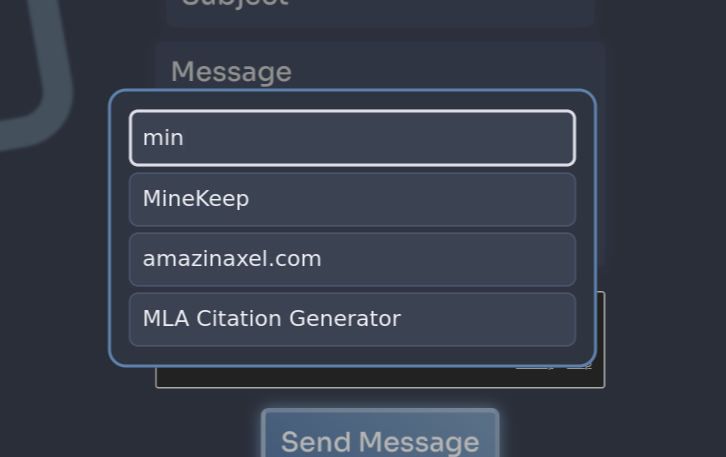
Searching normally is also how you see your bookmarks
Why I regret making it
WebkitGTK actually kinda sucks. And there's literally no replacement for it unless you want to spend hundreds of hours forking Firefox to achieve the same goals as Lightbrowse!
There's one big issue with Webkit: it's made by Apple. The GTK port is not very widely used, and it thus makes for a very confusing default user-agent: "Mozilla/5.0 (X11; Linux x86_64) AppleWebKit/605.1.15 (KHTML, like Gecko) Version/
The issue is the combination of X11/Linux x86_64 and Safari - there is no Safari for Linux! This default user agent is a liar. Captchas flag this UA as suspicious due to being so uncommon.

Now, if the web didn't track you so much, you could just spoof the UA to Firefox and call it a day. But its not so simple: try it and you'll find yourself looping on Cloudflare turnstile captchas infinitely and being unable to access some sites. Switching your UA to Firefox will not work because of very deep fingerprinting to see whether you're faking your user agent. Switch your user agent to Safari and you'll have similar issues, but all your keybinds use Cmd instead of Ctrl.
On top of not being able to access some sites at all, it also turns out that WebExtensions dont support uBlock Origin yet. Luckily, Webkit supports blocklists but it's very basic and easily detectable. Running a ublock filter list blocks most ads but now you cant access sites with adblock detection, which pretty much makes the adblock useless.
To make matters worse, you can't use cosmetic filters to hide things like cookie or banner popups, further reducing browsing effectivity.
Video playback is completely cooked to the point where all you can do on YouTube is watch a bunch of ads. Javascript-heavy sites like YouTube take more than double as long than Firefox to load. General page loading speed is noticeably slower than Firefox.
What now?
For right now, I have made my quick keybind continue to open Lightbrowse, and I keep Zen browser available on my system so I can use to access some sites.
I change my browser depending on my workflow. General usability in lightbrowse is completely awful for daily browsing and researching. But it works great and is so much faster than Firefox for quick searches, referencing documentation and image searching. This workflow works, but it could be better and will get better with time as Webkit catches up with Firefox/Gecko.